
Malwareless Initial Access through Web and API Exploitation

Red team engagements are goal-driven, not gadget-driven. As much as we love C2s and malware that help us achieve our goal, the point isn’t to drop a flashy implant or chase CVE scoreboards. It’s to achieve an objective: access the asset, prove the risk, and hand defenders a route map to fix it.
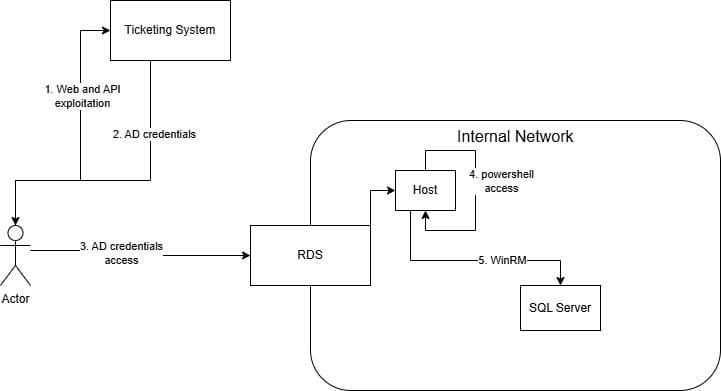
In this engagement, the objective was to reach the client’s SQL server over the Internet. We did it without a single malware binary; just web and API exploitation work, and careful hypothesis-driven testing.
This article is written from an operator perspective. I’ll show how reconnaissance narrowed the attack surface to a publicly reachable portal, why small differences in registration and API logic mattered, how role/elevation issues let us read user credentials, and how those credentials unlocked RDP access into the internal network. What we found, why it worked, and how to stop it. Names, domains, and any identifying details are redacted.
Reconnaissance: Identifying the Important Assets
Like with every other engagement, the first step to approaching a target is to spent a significant amount of time in recon. This means email addresses, LinkedIn profiles, social media, dark web leaks, public documents, etc. And of course, asset discovery. From my humble beginnings in bug bounties, I have some tricks that can bring value to asset discovery. Except for subdomain enumeration by bruteforcing and/or public SSL certificates, other sources for pulling assets can be:
- Search engines (Shodan, Censys)
- Google Dorking
- Domain mutations (A company with the domain
companyonline.tldmay also usecompany-online.tld) - Other company-related assets in the same ISP and country
❗The last point is, in my opinion, an often overlooked technique, where the operator looks for assets within the same ISP and usually the same country as the majority of the hosts aggregated. This is especially important for more local, country-based organizations, where having a dedicated ISP and hosting provider is important to avoid extra costs and complexity. The connection between the host and the company can be found via various ways. In this case, the discovered webpage's "Contact Us" link was pointing to the client's main domain.
Among the public-facing web applications, two portals stood out: a Remote Desktop Services host, and a task-management system reachable from the Internet. The key attributes that made the task-management system interesting:
- It’s a multi-tenant-ish product: employees of the client, as well as employees of the client’s customers use it to request IT support.
- Registration was allowed. That immediately raises the chance of misconfiguration or logic issues that an operator can exploit without privilege.
Part of good recon is finding the places humans touch: helpdesks, onboarding portals, client portals, and APIs tied to business processes.
Registration and uncovering issues
We experimented with account creation. Two behaviours were notable:
- Creating accounts with arbitrary public emails gave minimal visibility, an obvious defensive behaviour.
- Creating an account with a non-existent company email (no real mailbox behind it) unexpectedly unlocked more application functionality. Crucially, the application performed no email verification in either case.
This second behaviour expanded our attack surface: it allowed us to interact with company-scoped features (join companies, see more endpoints) without needing to own a real email address. It’s a small misstep from a developer’s perspective (no verification), but a large operational lever for an attacker.
❗Web pentesting tip: when registration is available try to register with an email address of the client's domain.
API logic abuse: enumerating companies, elevating role, and access credentials
Creating our own “company” in the application allowed us to discover some additional API calls that seemed to rely heavily on providing system-defined company IDs. Playing with the API revealed an authorization logic flaw: company IDs could be enumerated in an unauthorized and unauthenticated manner, and the API accepted requests to join companies and set roles without proper server-side checks. The steps to escalate privileges to another company are:
- Discover the ID of a company. The
fromCompanyIdparameter can be bruteforced to discover all companies and their IDs
Request:
GET /api/fromcompanytocompany?fromCompanyId=[ID]&toCompanyId=

Response:
[
...,
{"FromCompanyId":[ID],"FromCompanyName":"REDACTED","ToCompanyId":[ID],"ToCompanyName":"REDACTED"},
...
]
- After discovering the ID of the target company: elevating our user to admin privileges of the target company. This endpoint was discovered while trying to make another user an admin to our "company". For the exploit, we just change the
CompanyIdvalue to that of the target company's ID.
POST /api/companydepartmentadministrator?companyId=[TARGET COMPANY ID]&departmentId HTTP/2
Host: [REDACTED]
Cookie: [...]
Sec-Ch-Ua-Platform: "Linux"
X-Requested-With: XMLHttpRequest
...
UserId=[ATTACKER USER ID]&CompanyId=[TARGET COMPANY ID]&UserName=[ATTACKER USERNAME]&IsAccountManager=true
In short, the application trusted client-supplied context about company membership and role without performing authorization checks, a classic OWASP API Top 10 Broken Object Level Authorization (BOLA).
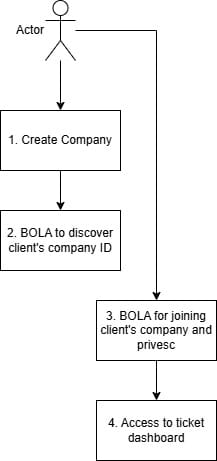
That failure mode is familiar: whether you call it BOLA, IDOR, or “business logic flaw in access control,” the effect is the same: an attacker can make themselves an admin of arbitrary tenant objects. This would give us access to the task view for that company.
❗API pentesting tip 1: It is not uncommon for an API to have the same issue system-wide. A BOLA in one endpoint can mean that the whole authorization mechanism is flawed at its core.
❗API pentesting tip 2: Although APIs are very often directly exploitable via a single vulnerability (90% of the issues are unauthorized calls), it is important to chain smaller issues findings for bigger impact. In this case, a company ID disclosure chained with a privilege escalation issue led to a complete takeover of any company.
Goldmine of a System
Viewing the dashboard as an admin showed a task list of things for the IT department. Searching around and analyzing the tickets, we realized that this was an IT support ticketing system. This means tickets for
- authorization access requests,
- Active Directory password reset requests
- internal and external system updates and management, etc.
The discovery that could be exploited with immediate action was the password reset requests. The vast majority of the password reset tickets were completed with the new passwords added to the ticket response in plain text. This seemed like a perfect way to test those credentials against that RDS host discovered earlier.
An RDS (Remote Desktop Services) host is a dedicated server that utilizes the RDP protocol to allow access to folders and applications in an internal network, based on AD permissions.
This is not a novel vulnerability in a single line of code. It’s a pipeline of human behaviour + insufficient data hygiene + excessive access scope.
❗Defender priorities: instrument ticket ingest for secret-like content, redact sensitive fields automatically, and restrict who can view full ticket bodies.
Lateral movement without implants: proxying, tooling, and credential use
Once we had RDP access to an internal landing host, it was easy to spawn a CMD or PowerShell terminal by running cmd.exe or powershell.exe. We executed network reconnaissance to identify additional hosts and services, then leveraged legitimate Windows administration tooling to enumerate services in-scope:
- Enumerate the domain:
nltest /DOMAIN_TRUSTS /PRIMARY - Enumerate domain users:
net user /domain - Enumerate domain groups:
net group /domain - Enumerate domain group users:
net group "Administrators" /domain
Using a reverse proxy channel through the compromised host with PowerProxy allowed us to leverage tooling such as Impacket scripts, nmap, etc. from our VPS.
❗If you have administrator access to a host, you can exclude Windows Defender from scanning on a specific path and move any tools there with powershell Add-MpPreference -ExclusionPath [PATH]Having access to so many support tickets means that we also have access to multiple accounts via password reset tickets, the ability to create tickets on behalf of users (risky), the occasional authorization access requests to specific hosts.
Having such a great amount of information in our hands, the only thing we had to do was wait for the perfect opportunity, i.e. the account with the appropriate rights to WinRM into the SQL server using evil-winrm-py, a Python alternative to the classic Evil-WinRM, via our proxy, or using native PowerShell in the RDS host:
# Test if WinRM is enabled on the target machine
Test-WSMan -ComputerName [COMPUTER_NAME]

# Run commands through WinRM
Invoke-Command -ComputerName [COMPUTER_NAME] -ScriptBlock { [COMMAND] }
Attack Path
Why this chain matters for red teams and defenders
This engagement highlights several broader truths about modern red teaming and enterprise risk:
- Strategic selection of the attack path. Just because you can attack everything, or send malware, doesn’t mean you have to. Choosing to go after that task management portal was a purposeful action.
- Web + API logic can be a first-class initial-access vector. At the appropriate situation, web and API bugs can yield extraordinary results.
- Human workflows are attack surface. Ticketing systems, onboarding portals, and helpdesk tools are full of human friction and secret sharing; they deserve DLP-like (Data Loss Prevention) treatment.
- Network segmentation and credential hygiene are the real mitigations. Even if credentials are exposed, layered access controls (MFA, conditional access, bastion hosts) make reuse much harder.
Adversaries don't break in; they log in.
Continue the discussion over on the 0x00sec community forum!